We have compiled a list of manufacturers, distributors, product information, reference prices, and rankings for Tool Management Software.
ipros is IPROS GMS IPROS One of the largest technical database sites in Japan that collects information on.

Tool Management Software Product List and Ranking from 7 Manufacturers, Suppliers and Companies | IPROS GMS

Last Updated: Aggregation Period:Jan 28, 2026~Feb 24, 2026
This ranking is based on the number of page views on our site.

Tool Management Software Manufacturer, Suppliers and Company Rankings

Last Updated: Aggregation Period:Jan 28, 2026~Feb 24, 2026
This ranking is based on the number of page views on our site.

  1. グーリングジャパン Aichi//Machine elements and parts
  2. WinTool (ウィンツール) Osaka//software
  3. 石田商会 Gifu//Machine elements and parts
  4. 4 システムクリエイト Osaka//Industrial Machinery
  5. 5 ZOLLER Japan Osaka//Testing, Analysis and Measurement

Tool Management Software Product ranking

Last Updated: Aggregation Period:Jan 28, 2026~Feb 24, 2026
This ranking is based on the number of page views on our site.

  1. MMS (Multi-Management System) 石田商会
  2. Tool Management System | GTMS Software | Existing shelves also managed digitally グーリングジャパン
  3. WinTool WebApp | WinTool Tool Management Software WinTool (ウィンツール)
  4. 4 Tool Management System | GTMS Software | Inspection Equipment Calibration Management グーリングジャパン
  5. 4 NC Simulation Integration | WinTool Tool Management Software WinTool (ウィンツール)

Tool Management Software Product List

1~16 item / All 16 items

Displayed results

Tool Management System | GTMS Software | Inspection Equipment Calibration Management

Not only tools but also the management of inspection instruments is digitized, solving the challenges of calibration management and inventory management all at once with the tool management software <GTMS>.

Guhring has built a track record of implementation around the world with its intelligent tool management software 'GTMS', which is packed with know-how for tool management. The Guhring Tool Management Software, which is the brain behind high performance, also demonstrates significant power in the field of inspection tool management. It is crucial that the calibration of inspection tools is reliably conducted within the deadline, ensuring that the tools in use are always calibrated and capable of measuring accurate values. However, on-site, various challenges, such as those illustrated below, are faced. [Examples of Challenges] ■ Calibration oversights and shortages occur with ledger-based management ■ Uncertainty about whether the inspection tools in use are properly calibrated and traceable ■ Use of inspection tools that have exceeded their calibration deadline, resulting in defective product judgments at delivery points ■ Lack of transparency regarding the location of inspection tools and who is holding them, among others However, by using the solutions provided by GUHRING, the challenges mentioned above can be improved, bringing "certainty" and "transparency" to inspection tool management, as well as resulting in "time-saving effects" by eliminating the time lost searching for the whereabouts of inspection tools.

  • Other cutting tools
  • Tool Management Software

Added to bookmarks

Bookmarks list

Bookmark has been removed

Bookmarks list

You can't add any more bookmarks

By registering as a member, you can increase the number of bookmarks you can save and organize them with labels.

Free membership registration

CAM Integration | WinTool Tool Management Software

Would you like to utilize the tool data from the WinTool integrated tool library in the CAM system while managing tool information at the machining site?

The WinTool Integrated Tool Library centrally manages tool data used within the company, including combinations of cutting tools, tooling, collets, and managing DXF contours and 3D models. NC programmers can access the WinTool Integrated Tool Library from their CAM systems, allowing them to create NC programs while selecting tool data. By properly managing tool data, it prevents situations where work must be halted due to incorrect tool data during CAM operations. Users of CAM will benefit from the advantages unique to WinTool, such as the ability to quickly identify resident tools on NC machine tools and stocked tools on tool shelves, as well as expedited arrangements through prior confirmation of the availability of inserts, cutting tools, and tooling. This is especially useful when multiple CAM systems are used within the company.

  • Other CAM related software
  • Tool Management Software

Added to bookmarks

Bookmarks list

Bookmark has been removed

Bookmarks list

You can't add any more bookmarks

By registering as a member, you can increase the number of bookmarks you can save and organize them with labels.

Free membership registration

Case Study - A Machine Tool Manufacturer That Achieved Standardization of Machining Business Processes

Utilize WinTool to visualize the location of tools. Ensure accurate tool setup and reliable attachment of tools to the tool magazine!

Case Study of WinTool Implementation at Agathon AG, Based in Switzerland Problems Before Implementation ● Limitations of the Existing System (unable to manage tool graphics information, lack of file linking features, etc.) ● Existence of Idle Tools Challenges Before Implementation ● Visualization and situational awareness of machining processes on the shop floor WinTool Implementation ● Construction of a Tool Library ● Integration with CAM Systems ● Integration with Tool Presetters ● Management of Machining Process Benefits of Implementation ● Smooth tool preparation work on the shop floor ● Visualization of tool locations, accurate tool setup, and installation on machines ● Increased productivity through standardization of machining processes

  • Process Control System
  • Other CAM related software
  • Other cutting tools
  • Tool Management Software

Added to bookmarks

Bookmarks list

Bookmark has been removed

Bookmarks list

You can't add any more bookmarks

By registering as a member, you can increase the number of bookmarks you can save and organize them with labels.

Free membership registration

Case study - A equipment manufacturer that integrated scattered tool databases within the company into one.

Utilizing WinTool, we consolidated the nine tool databases within the company into one!

Case Study of WinTool Implementation at Atlas Copco, Headquartered in Sweden Problems Before Implementation ● Use of an old system with only numbers and no graphics ● No common database for thousands of tool components (such as cutting tools, drills, inserts, etc.) Challenges Before Implementation ● Integrated management of tool data and tool information dispersed within the company WinTool Implementation ● Construction of a tool library ● Integration with CAM systems ● Management of machining process workflows Benefits of Implementation ● Return on investment period of 1.3 years ● Increased speed of work and reduced errors ● Use of the same tool data in the machining site and CAM software *Please also refer to the case study of WinTool implementation at Cabot, headquartered in Italy.

  • Process Control System
  • Other CAM related software
  • Other cutting tools
  • Tool Management Software

Added to bookmarks

Bookmarks list

Bookmark has been removed

Bookmarks list

You can't add any more bookmarks

By registering as a member, you can increase the number of bookmarks you can save and organize them with labels.

Free membership registration

Tool Storage System Integration | WinTool Tool Management Software

The connection between the tool storage system and the WinTool tool data management system expands the connectivity of data!

WinTool itself has a tool inventory management function, but by collaborating with a hardware-software integrated tool storage system, it can more robustly manage the tool issuance and return processes. By registering tool item numbers and names in WinTool and transferring them to the tool storage system, it prevents the double management of tool item information. On the other hand, by timely reflecting tool inventory transactions such as issuance and return recorded in the tool storage system back to WinTool, it becomes possible to grasp the inventory and available stock of tool items owned by the company on the WinTool integrated tool library. Additionally, it is also possible to send inventory transaction instructions from WinTool to automatic storage shelves that do not have inventory management functions. When collaboration is implemented, tool issuance and return are carried out on the tool storage system side, but it is also possible to manage order point management, purchase request generation, and inbound processing on the WinTool side instead of the tool storage system side. By integrating WinTool and the tool storage system, the utilization of tool data, which tends to be limited to inventory management, expands across the entire machining business process.

  • Other cutting tools
  • Tool Management Software

Added to bookmarks

Bookmarks list

Bookmark has been removed

Bookmarks list

You can't add any more bookmarks

By registering as a member, you can increase the number of bookmarks you can save and organize them with labels.

Free membership registration

Tool Presetter Integration | WinTool Tool Management Software

Expand data from the WinTool tool management system to the tool presetter and ensure the integrity of tool data!

By transferring the assembly tool data for measurement targets from WinTool to the tool presetter, we can prevent double entry of tool information, reduce the possibility of human error, and speed up the tool setup process. Additionally, it is also possible to reflect the data measured by the tool presetter back into WinTool. The measured data can be reflected in the WinTool assembly tool physical data and linked to jobs (machining tasks).

  • Process Control System
  • Tool Management Software

Added to bookmarks

Bookmarks list

Bookmark has been removed

Bookmarks list

You can't add any more bookmarks

By registering as a member, you can increase the number of bookmarks you can save and organize them with labels.

Free membership registration

MMS (Multi-Management System)

Digitalization of tool management. Real-time monitoring of various usage conditions.

Our company offers an MMS (Multi Management System) that accommodates various tools and auxiliary materials. It allows for the creation of reports from data stored in the cloud and enables remote monitoring of usage. Only designated operators can access the system, and it can be used easily at any time, 24/7. Please feel free to contact us if you have any inquiries. 【Features】 ■ Real-time tracking of who, when, what, and how much ■ Security management for expensive items ■ Access is possible anytime, like using a vending machine ■ Inventory management through the cloud eliminates the need for stocktaking *For more details, please download the PDF or feel free to contact us.

  • Vending machines
  • Tool Management Software

Added to bookmarks

Bookmarks list

Bookmark has been removed

Bookmarks list

You can't add any more bookmarks

By registering as a member, you can increase the number of bookmarks you can save and organize them with labels.

Free membership registration

Marsgo: A multi-tool library for multiple machine tools is available!

Improving work efficiency with multiple tool library management! Let me explain the greatness of "Multi-Tool Library" in BobCAD-CAM!

Marsugo is a document that picks up the functions and features of various products and introduces the "amazing!" aspects. "BobCAD-CAM," which has received positive feedback for its low-cost implementation and operation. Despite its overwhelmingly low price, it boasts a variety of modules and comprehensive features, making it an impressive 3D CAD/CAM system that is seeing an increase in inquiries. This time, we will introduce the newly added "Multi-Tool Library" feature. The more tools you have, the harder it is to manage them, right? Especially for users who own multiple machines, finding the right tools can be quite a challenge. The Multi-Tool Library is a very convenient feature that allows you to have multiple libraries, as the name suggests. You can manage tools in each library, which you can name, making it easy to see at a glance where each tool is located. This can significantly reduce the time spent searching for specific tools from a long list or changing tool settings. *You can download the document from the button below.

  • 3D CAD
  • 3D CAM
  • Tool Management Software

Added to bookmarks

Bookmarks list

Bookmark has been removed

Bookmarks list

You can't add any more bookmarks

By registering as a member, you can increase the number of bookmarks you can save and organize them with labels.

Free membership registration

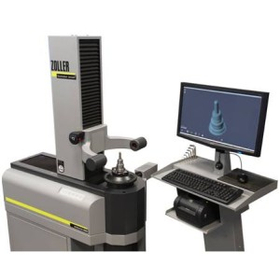
Significantly reduce the time spent on tool selection: Tool management software catalog and case studies.

Revealing the secret to reducing production costs by over 5 million yen annually! Significantly shortening tool setup time.

"ZOLLER TMS" is a system that accurately measures the shape of tools and selects the appropriate tools for machining tasks. It significantly reduces the preparation time for tools and equipment. Currently, we are offering a collection of case studies filled with tips for increasing production efficiency and reducing production costs! It includes detailed explanations of cases that have successfully achieved cost reductions of over 5 million yen annually, as well as methods for tool management. [Contents] ■ What costs can actually be reduced? ■ Actual simulations, etc. We introduce elements that can serve as hints for efficiency and cost reduction over 28 pages. *For more details, please check the catalog download.

  • Other cutting tools
  • Tool Sets
  • NC unit
  • Tool Management Software

Added to bookmarks

Bookmarks list

Bookmark has been removed

Bookmarks list

You can't add any more bookmarks

By registering as a member, you can increase the number of bookmarks you can save and organize them with labels.

Free membership registration

Tool Management System | GTMS Software | Existing shelves also managed digitally

Visualize inventory of tools, consumables, and others to reduce direct/indirect costs. Tool management software <GTMS> that can digitize inventory management even with existing shelves.

Guhring has accumulated a track record of implementation around the world with its intelligent tool management software 'GTMS', which is packed with know-how for tool management. The Guhring Tool Management Software, which is the brain behind high performance, can manage not only the inventory in GUHRING cabinets but also the tools stored in existing shelves that you have been using traditionally. Therefore, it can flexibly respond to needs that arise when considering improvements in tool management, such as: - To be honest, I don't feel the necessity to manage all items with an electronic control cabinet. - I want to manage inventory using only existing shelves / I want to use existing shelves in conjunction with GTMS cabinets. - I want to centrally manage inventory that cannot fit into the cabinet, such as large items or long materials. With GTMS, even with such implementation styles, you can break away from analog handwritten ledgers and digitize all inbound and outbound records, allowing for data accumulation, aggregation, and analysis. Of course, you can also utilize various features provided by the software, such as the automatic ordering function to prevent stockouts and recommendations for optimal inventory levels based on usage analysis.

  • Other cutting tools
  • Other production management systems
  • cabinet
  • Tool Management Software

Added to bookmarks

Bookmarks list

Bookmark has been removed

Bookmarks list

You can't add any more bookmarks

By registering as a member, you can increase the number of bookmarks you can save and organize them with labels.

Free membership registration

Case Study - A Machinery Parts Manufacturer Improved the Accuracy of Production Preparation Operations

Achieving compliance with manufacturing schedules and minimizing setup time through accurate production preparation of production resources/tools using WinTool!

Case Study of WinTool Implementation at Schade Maschinenbau, a Company Based in Germany Problems Before Implementation ● The existence of complex requirements for tooling over 4,000 types of tools ● Manufacturing delays and schedule delays due to insufficient production preparation Challenges Before Implementation ● Prevention of issues leading to manufacturing schedule delays and accurate production preparation ● Reduction of tool setup time and improvement of machine utilization rates WinTool Implementation ● Construction of a tool library ● Introduction of a tool inventory management module ● Implementation of a barcode reader interface Effects of Implementation ● Ability to understand the availability and location of tools without leaving their seats ● Flexible definition of tool assemblies and pre-evaluation of setup combinations ● Rapid response to unexpected cutting issues (quickly searching for alternative tools or cutting conditions) *Please also refer to the case study of WinTool implementation at Saikatec, a company based in Germany.

  • Process Control System
  • Other CAM related software
  • Other cutting tools
  • Tool Management Software

Added to bookmarks

Bookmarks list

Bookmark has been removed

Bookmarks list

You can't add any more bookmarks

By registering as a member, you can increase the number of bookmarks you can save and organize them with labels.

Free membership registration

Case Study - A Tool Manufacturer that Centralized Tool Information Internally to Promote Collaboration

Utilizing WinTool, we reengineered our company's machining business processes. We successfully reduced the time and costs required for machining operations!

Case Study of WinTool Implementation at Seco Tools' Italian Branch Based in Sweden Problems Before Implementation ● Creation of tool data individually using CAM and NC simulation systems ● Handwritten creation of tool setup sheets ● Lack of standardization in tool names used within the company Challenges Before Implementation ● Improvement and standardization of machining business processes WinTool Implementation ● Construction of a tool library ● Integration with CAM systems and NC machining simulation systems ● Systematization of physical tool movement management Benefits of Implementation ● Elimination of information discrepancies through centralized management of tool information ● Increased operational efficiency through automation of detailed tool lists and tool setup sheet generation ● Promotion of collaboration between CAM engineers and machining floor operators

  • Process Control System
  • Other CAM related software
  • Other cutting tools
  • Tool Management Software

Added to bookmarks

Bookmarks list

Bookmark has been removed

Bookmarks list

You can't add any more bookmarks

By registering as a member, you can increase the number of bookmarks you can save and organize them with labels.

Free membership registration

WinTool WebApp | WinTool Tool Management Software

Instantly check WinTool tool information and NC folder information on your tablet or smartphone!

In an environment where computers are not used in the machining area, you can quickly access tool information, various files and data related to machining tasks, and job information. This application is an arrangement of the WinTool desktop application for mobile environments, promoting a paperless environment in the machining area. It is also possible to register new tool data, change the status of the NC folder, input observations and notes, update job information such as starting and ending machining or changing process steps, and add or register the movement of actual tool information. Additionally, it is possible to conduct inventory transactions of tool components in the tool room, which helps improve operational efficiency.

  • Process Control System
  • Tool Management Software

Added to bookmarks

Bookmarks list

Bookmark has been removed

Bookmarks list

You can't add any more bookmarks

By registering as a member, you can increase the number of bookmarks you can save and organize them with labels.

Free membership registration

Tool Organizer

Changing cutting tool management with 'connection'! Centralized management of production information to support cost reduction.

We would like to introduce the "Tool Organizer" that we handle. It is a "high-function electronic cabinet" that reduces the time spent searching for tools, and with the "TMS (Tool Management System)," you can easily grasp dimensions, specifications, usage amounts, and inventory levels at a glance, preventing tool shortages. Additionally, with the "Tool Analysis Tool," you can discover points for improvement and receive diagnostic reports, leading to further efficiency and cost reduction. 【Features】 ■ The storage locations of tools are visually identifiable ■ Records the history of tools taken out ■ Various items can be checked on the TMS screen ■ Accessible from various devices ■ The "Tool Analysis Tool" can be used on a members-only website *For more details, please refer to the PDF materials or feel free to contact us.

  • Other cutting tools
  • Tool Management Software

Added to bookmarks

Bookmarks list

Bookmark has been removed

Bookmarks list

You can't add any more bookmarks

By registering as a member, you can increase the number of bookmarks you can save and organize them with labels.

Free membership registration

Mobile App EVOtools Mobile

Smart management of tools with a tablet/smartphone app.

The German industrial software manufacturer EVO has started offering a Japanese version of its mobile app, EVOtools Mobile. EVOtools Mobile is a fundamental element of the digitalization of production, also known as Industry 4.0. We are bringing this from Germany to Japan. With the EVOtools Mobile app, it is possible to recognize barcodes marked on tools and tool packages using tablets and smartphones. This allows for the digital recording of tool retrieval operations from tool cabinets or their drawers. While it may be a small step towards paperless production, it is an important step in promoting it. Staff on the production floor will always have complete and up-to-date information about the available tools in tool cabinets and magazines. On the other hand, with the desktop version, this app allows users to import tool data from Excel files and send it to the EVOtools tool database. This establishes a foundation for fast data management and serves as an excellent catalyst for achieving paperless production.

  • Other core systems
  • Tool Management Software

Added to bookmarks

Bookmarks list

Bookmark has been removed

Bookmarks list

You can't add any more bookmarks

By registering as a member, you can increase the number of bookmarks you can save and organize them with labels.

Free membership registration

NC Simulation Integration | WinTool Tool Management Software

Let's utilize the tool data from the WinTool integrated tool library in NC machining simulation, while also managing tool information at the machining site!

The WinTool Integrated Tool Library centrally manages tool data used in-house, including combinations of cutting tools, tooling, collets, and manages DXF contours and 3D models. NC programmers can retrieve the tool data they need from the WinTool Integrated Tool Library on the NC machining simulation screen and use it for verification. It is possible to select tool data one by one from WinTool, or to import a list of tools used in the NC program all at once. By using the same tool data as the tools actually used in the machining environment, including products from tool manufacturers and special tools, it contributes to enhancing the accuracy of NC machining simulations.

  • Other CAM related software
  • Tool Management Software

Added to bookmarks

Bookmarks list

Bookmark has been removed

Bookmarks list

You can't add any more bookmarks

By registering as a member, you can increase the number of bookmarks you can save and organize them with labels.

Free membership registration